Wednesday, January 14, 2015

Reporting Services 2008 R2 crashing


Reporting Services 2008 R2 crashing on Windows Server 2008 R2

Recently came across one of the issue with SQL server reporting services 2008 R2. The Report manager and ReportService Webservice URL both were not opening. The ReportService URL threw "500 internal server error". I Was clueless on what might be the issue. The Reportserver configuration status was showing that it was initialized.


The next best place to look in such cases would be the Reporting services logs.
Restarted the Reporting services and then tried to open the Report Service URL.


On reviewing the Reporting service logs under <InstallPath>:\Program Files\Microsoft SQL Server\MSRS10_50.<ReportServerInstanceName>\Reporting Services\LogFiles
The File name would be like ReportServerService__<>.log
Found the following errors in the logs


Error: The type initializer for 'Microsoft.ReportingServices.Diagnostics.Canonicalization' threw an exception..
library!DefaultDomain!9b0!01/14/2015-15:43:52:: e ERROR: Throwing Microsoft.ReportingServices.Diagnostics.Utilities.ReportServerHttpRuntimeInternalException: Failed to intialize HTTP Runtime, Microsoft.ReportingServices.Diagnostics.Utilities.ReportServerHttpRuntimeInternalException: An internal or system error occurred in the HTTP Runtime object for application domain ReportServer_MSSQLSERVER_0-1-130657040318084612.  ---> System.TypeInitializationException: The type initializer for 'Microsoft.ReportingServices.Diagnostics.Canonicalization' threw an exception. ---> System.IO.FileNotFoundException: Could not load file or assembly 'System.Core, Version=3.5.0.0, Culture=neutral, PublicKeyToken=b77a5c561934e089' or one of its dependencies. The system cannot find the file specified.
File name: 'System.Core, Version=3.5.0.0, Culture=neutral, PublicKeyToken=b77a5c561934e089'
   at Microsoft.ReportingServices.Diagnostics.Canonicalization..cctor()
WRN: Assembly binding logging is turned OFF.
To enable assembly bind failure logging, set the registry value [HKLM\Software\Microsoft\Fusion!EnableLog] (DWORD) to 1.
Note: There is some performance penalty associated with assembly bind failure logging.
To turn this feature off, remove the registry value [HKLM\Software\Microsoft\Fusion!EnableLog].
   --- End of inner exception stack trace ---
Server stack trace:
   at Microsoft.ReportingServices.Diagnostics.Canonicalization.InitReportBuilderFileList(String rbRootDir)
   at ReportingServicesHttpRuntime.RsHttpRuntime.Initialize(RsAppDomainType type, String virtualDir, String physicalDir)
   at System.Runtime.Remoting.Messaging.StackBuilderSink._PrivateProcessMessage(IntPtr md, Object[] args, Object server, Int32 methodPtr, Boolean fExecuteInContext, Object[]& outArgs)
   at System.Runtime.Remoting.Messaging.StackBuilderSink.SyncProcessMessage(IMessage msg, Int32 methodPtr, Boolean fExecuteInContext)
Exception rethrown at [0]:
   at System.Runtime.Remoting.Proxies.RealProxy.HandleReturnMessage(IMessage reqMsg, IMessage retMsg)
   at System.Runtime.Remoting.Proxies.RealProxy.PrivateInvoke(MessageData& msgData, Int32 type)
   at ReportingServicesHttpRuntime.RsHttpRuntime.Initialize(RsAppDomainType type, String virtualDir, String physicalDir)
   at ReportingServicesHttpRuntime.RsHttpRuntime.Create(RsAppDomainType type, String vdir, String pdir, Int32& domainId)
   --- End of inner exception stack trace ---;
appdomainmanager!ReportServer_0-1!9b0!01/14/2015-15:43:52:: i INFO: Appdomain:3 ReportServer_MSSQLSERVER_0-1-130657040318084612 unloading
library!DefaultDomain!9b0!01/14/2015-15:43:52:: e ERROR: Throwing Microsoft.ReportingServices.Diagnostics.Utilities.ReportServerAppDomainManagerException: Failed to create Report Server HTTP Runtime, Microsoft.ReportingServices.Diagnostics.Utilities.ReportServerAppDomainManagerException: An error occurred when attempting to start the application domain ReportServer within the Report Server service. ---> Microsoft.ReportingServices.Diagnostics.Utilities.ReportServerHttpRuntimeInternalException: An internal or system error occurred in the HTTP Runtime object for application domain ReportServer_MSSQLSERVER_0-1-130657040318084612.  ---> System.TypeInitializationException: The type initializer for 'Microsoft.ReportingServices.Diagnostics.Canonicalization' threw an exception. ---> System.IO.FileNotFoundException: Could not load file or assembly 'System.Core, Version=3.5.0.0, Culture=neutral, PublicKeyToken=b77a5c561934e089' or one of its dependencies. The system cannot find the file specified.
   --- End of inner exception stack trace ---;
rshost!rshost!9b0!01/14/2015-15:43:52:: e ERROR: Failed to create HttpRuntime 80131500.
rshost!rshost!9b0!01/14/2015-15:43:52:: e ERROR: Failed to get appdomain 80131500, pipeline=0x0000000000133A40.
rshost!rshost!9b0!01/14/2015-15:43:52:: e ERROR: Error state. Internal abort for pipeline=0x0000000000133A40 ...

The one which caught my attention was

System.IO.FileNotFoundException: Could not load file or assembly 'System.Core,
Version=3.5.0.0, Culture=neutral, PublicKeyToken=b77a5c561934e089' or one of its dependencies. The system cannot find the file specified.
File name: 'System.Core, Version=3.5.0.0, Culture=neutral, PublicKeyToken=b77a5c561934e089'

Now my first action was to look for the file System.Core in the GAC

Opened the assembly folder by typing Assembly in the Run windows.
Tried to look for System.Core. It was not present there. Now the question is how do we get the file there.  from the error message it is clear that the file belonged to .net framework 3.5 "Version=3.5.0.0". Also the operating system was Windows server 2008 r2.  The .net framework 3.5 is part of the operating system features. We need to check on the status of .net framework 3.5.

Opened the Server manager and selected features. The Feature for .net framework 3.5 was disabled.  So enabled the .netframework 3.5 sp1 feature and then completed the installation.  Once the installation was completed. Then restarted the Reporting services. Now tried to access both the Reporting services and ReportManager both of them worked fine.




Tuesday, September 2, 2014

T-SQL Ref Guide

Convert Datetime field to just date field for comparing the date part and ignoring the time part:
           
              Convert(DATE,OrderDatetime,102)='2014-01-01'


Getting the Rows to Column in a Comma separated value
Step1:
Create a Table type
CREATE TYPE TABLEVALUES AS TABLE
(
    VALUE1 NVARCHAR(100)

)


Step2:
Create a function to return the values in CSV
      Create FUNCTION UFN_TABLETOCSV
      (
         @TABLEVALUE TABLEVALUES READONLY
      )
     RETURNS NVARCHAR(500)
     AS
     BEGIN
       DECLARE @CSVSTRING NVARCHAR(500)
       SELECT @CSVSTRING= COALESCE(CONVERT(NVARCHAR(10),@CSVSTRING)+ ', ', '') + VALUE1        FROM @TABLEVALUE
       RETURN @CSVSTRING


     END
 
Step3 
Now you can consume the function in your queries/SP
Declare the variable for the type Tablevalue

 
                  DECLARE @TEMPEMP TABLEVALUES

Insert the value to the tablevalue variable


                 INSERT INTO @TEMPEMP
                 SELECT EMPLOYEEID FROM EMPLOYEES


Now You can use the select statement with the function call

                   SELECT DBO.UFN_TABLETOCSV (@TEMPEMP)


Alternate Method: In the previous method we may encounter performance issue as we are calling the function at each row. We can overcome this using the following method.


You can use the XML path with the select Query to get the results in CSV format


Select DepartmentId ,Convert(nvarchar(Max),( select [EmployeeId]+',' from EmployeeTable ET 
Where ET.DepartmentId=Dep.DepartmentId for xml path(''), type)) as Employees From Department Dep


Wednesday, March 12, 2014

How to get Difference between two databases?

 
As a DBA one of the task one would face at some point of time is to get the differenced between two databases. Generally we may resort to some third party tools such as SQL Diff, SSDT Schema compare etc.  Being a DBA it should not be that hard to get the difference between two databases. We could use the SQL Server's Object Catalog views and get all the differences we want.
 
Here are some general differences we want to compare
  1. Tables present in Database 1 and Not present in Database 2
  2. Tables not present in Database 1 and Present in Database 2
  3. Tables present in Both the database But have column level changes
    • Data type Changes
    • Newly added columns
    • Columns which were dropped
You can use the following set to queries to get the differences.

1. Tables present in Database 1 and Not present in Database 2

                    SELECT  t.name as "TableName FROM DB1.sys.tables t
            EXCEPT
            SELECT  t.name  FROM DB2.sys.tables t

 
2. Tables not present in Database 1 and Present in Database 2


                    SELECT  t.name as "TableName FROM DB2.sys.tables t
            EXCEPT
            SELECT  t.name  FROM DB1.sys.tables t

3. Column Changes(Data Type Changes)


                   SELECT  T.[name] AS [table_name], AC.[name] AS [column_name], 
              TY.[name] AS system_data_type,Ac.max_Length, Ac.precision,Ac.scale,
              T1.[name] AS [table_name_Old], AC1.[name] AS [column_name_old], 
              TY1.[name] AS system_data_type_Old
           FROM    DB1.sys.[tables] AS T 
           INNER JOIN DB1.sys.[all_columns] AC ON T.[object_id] = AC.[object_id]
           INNER JOIN DB1.sys.[types] TY ON AC.[user_type_id] = TY.[user_type_id]
           INNER JOIN DB2.sys.[tables] AS T1  on T.name=T1.name
           INNER JOIN DB2.sys.[all_columns] AC1 ON T1.[object_id] =

           AC1.[object_id] AND AC.name=AC1.name INNER JOIN DB2.sys.[types] TY1 ON
           AC1.[user_type_id] =TY1.[user_type_id] AND TY.name<>TY1.name
           ORDER BY t.name


4. Column Changes (Newly added Columns):
           SELECT Table_Name, Column_name,  type_name(b.user_type_id), b.max_length,
        B.precision,B.scale
        FROM
        (
            SELECT  T.[name] AS [table_name], AC.[name] AS [column_name] 
            FROM    DB1.sys.[tables] AS T 
            INNER JOIN DB2.MASDirect.sys.[tables] tx ON t.name=tx.name
            INNER JOIN [MASNEW].sys.[all_columns] AC ON T.[object_id] =

              AC.[object_id] 
            INNER JOIN [MASNEW].sys.[types] TY ON AC.[system_type_id] =
             TY.[system_type_id]
            EXCEPT
             SELECT 
             T1.[name] AS [table_name], AC1.[name] AS [column_name]   
             FROM   DB2.sys.[tables] AS T1  
             INNER JOIN DB2.sys.[all_columns] AC1 ON T1.[object_id] =

             AC1.[object_id]
            INNER JOIN DB2.sys.[types] TY1 ON AC1.[system_type_id] =

            TY1.[system_type_id]
            ) as A
            INNER JOIN DB1.sys.all_columns AS b ON a.table_name=

            OBJECT_NAME(object_id,db_id('DB1')) AND a.column_name=b.name
          ORDER BY table_name


5. Column Changes(Columns which were dropped)
         SELECT 
          T1.[name] AS [table_name], AC1.[name] AS [column_name]   
          FROM    DB2.sys.[tables] AS T1  
          INNER JOIN DB1.sys.[tables] tx on t1.name=tx.name
          INNER JOIN DB2.sys.[all_columns] AC1 ON T1.[object_id] =

          AC1.[object_id]
         INNER JOIN DB2.sys.[types] TY1 ON AC1.[system_type_id] =

         TY1.[system_type_id]
       EXCEPT
        SELECT 
          T.[name] AS [table_name], AC.[name] AS [column_name] 
         FROM DB1.sys.[tables] AS T  

        INNER JOIN DB2.sys.[tables] tx on t.name=tx.name
        INNER JOIN DB1.sys.[all_columns] AC ON T.[object_id] = AC.[object_id]
       INNER JOIN DB1. sys.[types] TY ON AC.[system_type_id] =

        TY.[system_type_id]


These queries may come handy. Hope it is useful to someone.


Thursday, June 20, 2013

Taking backup of all the SQL server databases using a single TSQL Command

Is it possible to take the backup of all the SQL server databases in one single command?

Yes, It is possible to take the backup of SQL server databases in one single command. But it is an undocumented command so needless to say it is "AS-IS".
The command I used was sp_msforeachdb. The command given below takes the backup of all the databases including the system databases.

sp_msforeachdb 'backup database ? to disk="D:\\BACKUPLocation\?_dev.bak"'

You may see error in the output message about TEMPDB but that is fine. This cannot be tweaked further to take only user databases.     

Please leave a command if you like this tip.

Tuesday, June 4, 2013

Error: "Incorrect syntax near ')'." When Passing function to a Stored procedure

Let us say I have a requirement to pass the current date time to a stored procedure. 
For example let us consider the following SP
 
CREATE PROCEDURE [dbo].[DisplayDate](@Curr_Date DATETIME)

AS SELECT @Curr_Date
 
When I try to execute it with the parameter as getdate(). I would receive the following error

exec [DisplayDate] getdate()

Msg 102, Level 15, State 1, Line 1

Incorrect syntax near ')'.

 
Theorically it should have worked. There is a Limitation on the way we can use it with a stored procedures.

According to the Books online article on
Parameters (Database Engine)
http://technet.microsoft.com/en-us/library/ms190248(v=SQL.105).aspx

"When a stored procedure or function is executed, input parameters can either have their value set to a constant or use the value of a variable. Output parameters and return codes must return their values into a variable. Parameters and return codes can exchange data values with either Transact-SQL variables or application variables."

So it is clear that we cannot use any functions directly with an stored procedure.
So we have to look at other alternatives.

For example
The above stored procedure can be rewritten as
CREATE PROCEDURE [dbo].[DisplayDate]

AS SELECT Getdate()

So we need to consider the fact that we cannot pass the function directly to the stored procedure instead we have to either use it in variable or use the function directly.


Friday, May 31, 2013

Error: Unable to load rule class 'ASSPIExistingFarmUnconfiguredWarningCheck Error code 0x84BE0004.” while installing the SQL server 2012.


How to solve the Error


“Unable to load rule class 'ASSPIExistingFarmUnconfiguredWarningCheck


Error code 0x84BE0004.” while installing the SQL server 2012.


I was given a task to install the SQL server 2012 on the machine. I was very enthusiastic in doing the installation. I ignored the fact that my C drive was running out of disk space. As expected the installation failed. The installation was not able to even rollback to the previous state.  I had to kill the installation.


Since the cause for failure was known, I started adding some disk space to the drive on my virtual machine. Also I cleaned up the failed install. Ensured that all the SQL 2012 components were cleaned up successfully.


I started with the installation of SQL 2012 once again. Now I faced a new error during the installation as soon I was done with feature selection page and clicked on the next.

I got the following error


“Unable to load rule class 'ASSPIExistingFarmUnconfiguredWarningCheck

Error code 0x84BE0004.”


Since I had previous experience in troubleshooting the installation issue with SQL server. I started to look into the SQL server setup logs


The details.txt showed the following errors


(08) 2013-05-30 15:13:41 Slp: Send result to channel : RulesEngineNotificationChannel

(08) 2013-05-30 15:13:41 Slp: Loading rule: ASSPIExistingFarmUnconfiguredWarningCheck

(01) 2013-05-30 15:13:41 Slp: Error: Action "Microsoft.SqlServer.Configuration.UIExtension.WaypointAction" threw an exception during execution.

(01) 2013-05-30 15:13:41 Slp: Microsoft.SqlServer.Setup.Chainer.Workflow.ActionExecutionException: Thread was being aborted. ---> System.Threading.ThreadAbortException: Thread was being aborted.

(01) 2013-05-30 15:13:41 Slp:    at System.Threading.WaitHandle.WaitOneNative(SafeWaitHandle waitHandle, UInt32 millisecondsTimeout, Boolean hasThreadAffinity, Boolean exitContext)

(01) 2013-05-30 15:13:41 Slp:    at System.Threading.WaitHandle.WaitOne(Int64 timeout, Boolean exitContext)

(01) 2013-05-30 15:13:41 Slp:    at Microsoft.SqlServer.Configuration.UIExtension.Request.Wait()

(01) 2013-05-30 15:13:41 Slp:    at Microsoft.SqlServer.Configuration.UIExtension.UserInterfaceProxy.NavigateToWaypoint(String moniker)

(01) 2013-05-30 15:13:41 Slp:    at Microsoft.SqlServer.Configuration.UIExtension.WaypointAction.ExecuteAction(String actionId)

(01) 2013-05-30 15:13:41 Slp:    at Microsoft.SqlServer.Chainer.Infrastructure.Action.Execute(String actionId, TextWriter errorStream)

(01) 2013-05-30 15:13:41 Slp:    at Microsoft.SqlServer.Setup.Chainer.Workflow.ActionInvocation.ExecuteActionHelper(TextWriter statusStream, ISequencedAction actionToRun, ServiceContainer context)

(01) 2013-05-30 15:13:41 Slp:    --- End of inner exception stack trace ---

(01) 2013-05-30 15:13:41 Slp:    at Microsoft.SqlServer.Setup.Chainer.Workflow.ActionInvocation.ExecuteActionHelper(TextWriter statusStream, ISequencedAction actionToRun, ServiceContainer context)

(01) 2013-05-30 15:13:41 Slp:    at Microsoft.SqlServer.Setup.Chainer.Workflow.ActionInvocation.ExecuteActionWithRetryHelper(WorkflowObject metaDb, ActionKey action, ActionMetadata actionMetadata, TextWriter statusStream)

(01) 2013-05-30 15:13:41 Slp:    at Microsoft.SqlServer.Setup.Chainer.Workflow.ActionInvocation.InvokeAction(WorkflowObject metabase, TextWriter statusStream)

(01) 2013-05-30 15:13:41 Slp:    at Microsoft.SqlServer.Setup.Chainer.Workflow.PendingActions.InvokeActions(WorkflowObject metaDb, TextWriter loggingStream)

(01) 2013-05-30 15:13:41 Slp:    at Microsoft.SqlServer.Setup.Chainer.Workflow.ActionEngine.RunActionQueue()

 Now I started to look into what is the rule ASSPIExistingFarmUnconfiguredWarningCheck corresponding to  found this in the SystemConfigurationCheck_Report.htm


ASSPIExistingFarmUnconfiguredWarningCheck
 Checks whether SharePoint is configured, and if not, recommends adding the Database Engine to the installation.
Not applicable
This rule does not apply to your system configuration


Well this check is if sharepoint is configured on the db server. But I do not have sharepoint configured.

I tried to check if anyone else is facing the same issue but unfortunately I was not able find many hits on this. So I started to check what next step to resolve this issue is. I started the SQL server installation and selected the repair


I ran through the set up wizard. The fact that the installation was running proves that even though I had removed the components from my server, still there were some left overs which may be due to the low disk condition the rollback my not have happened correctly.

Once the repair completed I was able to run the installation without any issues.

 
Thank you for you time in viewing this blog. Please feel free comment with your questions regarding this article.

Friday, January 25, 2013

How to get a SSL Configured on SQL server.

Getting a valid Certificate:


The first steps involves getting a valid certificate from the certificate autority. Since I do not have a Certificate Authority (CA) of my own. I will make use of a utility called MakeCert.exe which is part of .net Framework SDK. You can download it from the following link .NET Framework 2.0 Software Development Kit (SDK) (x86).

Just any certificate cannot be used to enable SSL on SQL server. There are certain requirements a certificate should meet. These are described in the following knowledge base article Encrypting Connections to SQL Server.
Certificate Requirements


For SQL Server to load a SSL certificate, the certificate must meet the following conditions:
  • The certificate must be in either the local computer certificate store or the current user certificate store.
  • The current system time must be after the Valid from property of the certificate and before the Valid to property of the certificate.
  • The certificate must be meant for server authentication. This requires the Enhanced Key Usage property of the certificate to specify Server Authentication (1.3.6.1.5.5.7.3.1).
  • The certificate must be created by using the KeySpec option of AT_KEYEXCHANGE. Usually, the certificate's key usage property (KEY_USAGE) will also include key encipherment (CERT_KEY_ENCIPHERMENT_KEY_USAGE).
  • The Subject property of the certificate must indicate that the common name (CN) is the same as the host name or fully qualified domain name (FQDN) of the server computer. If SQL Server is running on a failover cluster, the common name must match the host name or FQDN of the virtual server and the certificates must be provisioned on all nodes in the failover cluster.
  • SQL Server 2008 R2 and the SQL Server 2008 R2 Native Client support wildcard certificates. Other clients might not support wildcard certificates. For more information, see the client documentation and KB258858.
So inorder generate a proper certficate on MakeCert utility I used the following command

MakeCert "c:\temp\MyCertnew.cer" -pe -n "CN=Hostname.Contoso.com" -ss my -sr LocalMachine -a sha1 -sky exchange -eku 1.3.6.1.5.5.7.3.1 -sp "Microsoft RSA SChannel Cryptographic Provider" -sy 12 -iR LocalMachine 

Once the command is completed you can check the Certificate store in the local computer for the certificate. It should look similar to the ones shown below.


 Now let us map each of the command to see if the certificate fulfils our requirement for SQL server.

-pe-- Create a Private Exportable Key.
-n "CN=Hostname.Contoso.com" -- Set the subject propert with the host FQDN name.
-ss -- Load the certificate in the local store.
-sr-Load the certificate in the local computer store.
-a Signature algorithm used.
-sky exchange-- Set Key spec option on AT_Exchange
-eku-- Enhanced Key used for setting certificate for server authentication.
-sp-- Cryptographic API provider
-sy-- CryptoAPI providers
-ir-- issue certificate store.

So we have got pretty much what is required for configuring SSL on the SQL Server.

Now the questions is how do we confirm that the certificate I have from the CA is valid
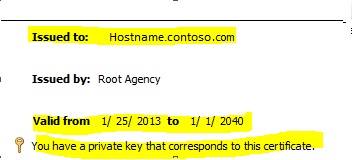
Let us verify the certificate properties.

The Hostname.contoso.com is a valid FQDN name
The validity of the certificate
and the message " You have a private key that corresponds to this certificate"


The Enhanced key usage property should show the purpose as Server authentication
the subject should also show the valid FQDN name.


Once we have validated it we can use this certificate to configure SQL server using SQL server configuration manager.
Right click on the SQL server 2005 Network configuration
Right click on Protocols for MSSQLSERVER and then select the certificate tab
Under the drop down you can see the certificate.


Also under the flags tab select " Force protocol encryption"


Now go ahead and restart the SQL server. Once we have restarted successfully we can look up the SQL server errorlog to confirm if the certificate is loaded correctly

We should see a message similar to

2013-01-25 13:14:27.150 Server The certificate was successfully loaded for encryption.

Now let us connect to the SQL server and verify if our connections are encrypted.

We could use the following DMV to check the status of the connections


please feel free to ask your question using the comment section.